adbrite

Star cricket live streaming

Watch live world cup matches live and exclusive here just click on the above banner.

Under this section all posts are related to hacking

You will find the posts related to hacking here the posts are nice and can be very useful to you.

The post under title Gadgets

Get to know about new and interesting gadgets.

This is default featured post under the category Computer

Computer related posts under this topic.

Showing posts with label COMPUTER. Show all posts

Tuesday, March 8, 2011

How to Create Animation in Windows Live Movie Maker using MS Paint


Windows Live Movie Maker is a fun application that is part of the Windows Live suite of applications that Microsoft has developed to give users the ability to jazz up videos to make them look more professional.
Unfortunately, there is still no way to create animation in Windows Live itself however. This doesn’t mean you’re dead in the water though, as there is a way to create animation by combining MS Paint with Movie Maker, and it all harkens back to the old days of cartoon animation.
To begin, load MS Paint and start start drawing something that you would like to animate. In this example, we will create the animated effect of a car moving across the screen from one side to the other.
We begin by drawing the car freehand using all default attributes.

Draw Car
Next, use the Select tool to “capture” the car. Draw a rectangle around the car as close to the car as possible, and then let go; next click on the Cut command on the main menu.
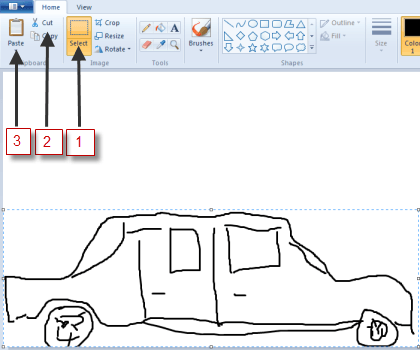
Selected, then Cut
As soon as you click on Cut, the car should disappear, then immediately click on thePaste icon. The picture you just cut out should now reappear, with the frame still around it, this means you can drag it to wherever you wish on the paint canvas. To create the illusion of movement, move the image (car) to one side of the screen to begin its journey across the screen, moving from left to right:

Front of Car Showing in Paint
Click the File command icon, and then choose Save as. Choose any filename you like, but end it with the number 1. In this case, we’ll call it c1, for car 1.
Next, hit the Back icon to undo what you just did; the car should disappear again. Click on the Paste icon again, to paste it back in, then move it again, just as you did the first time, only this time, put it slightly ahead of where you did the first time.

Midfront of Car in Paint
Then, do the Save as thing again, only this time, name it with a 2, e.g. c2.
Repeat this whole process as many times as it takes to get the car moved all the way across the screen with each step along the way saved as a unique series of  consecutive file names.
Then, close down Paint and fire up Windows Live Movie Maker; click on Add videos and photos:
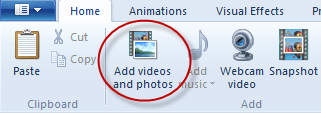
Add Videos and photos ot WLMM
Use the file manager tool that is launched to maneuver to and locate the files you just created in Paint. Double-click on the first one, in this case, C1, to open it. It should look something like this:
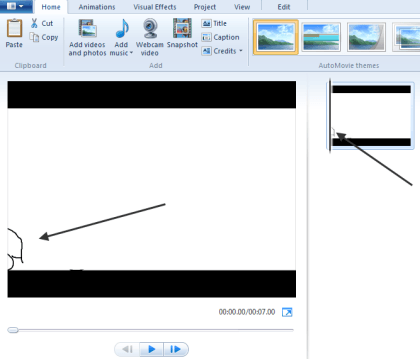
WLMM with first Image
It should show up in both the big main pane and in the little pane on the right, indicating that it will be the first image displayed in the “video.”
Open the rest of the images you created in Paint, one after another in sequence until all of the images have been loaded.
If you choose to play the movie as things are at this point, the time that each image is shown on the screen would be far too long, and thus it wouldn’t look animated. To fix that, we need to change the amount of time each image is displayed.
To do that, click on the the first image in the sequence, then while holding down the Shift key, move to the last one, then click on it as well. This should cause all of your images to be selected. It should look something like this:

Highlighted Sequence of Cars
Note: The bottom part of the image above was cut off for clarity.
Next, click on the Edit tab from the main menu and type .25, as in ¼ of a second, in the duration box. You want the application to hold onto each picture just long enough for it to be displayed,which means the player will move through all of them quickly enough to simulate motion.
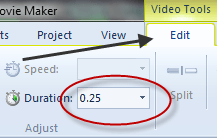
View and Edit Duration
Finish by clicking the Play button under the main viewing screen:
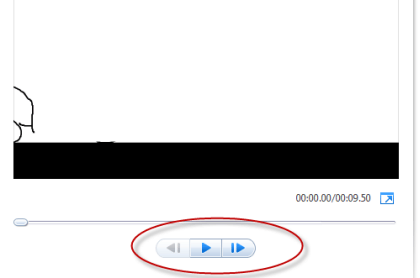
Play Button
You should see your images load sequentially, one after the other, quickly enough so that it appears as if your image is moving across on the screen. This is exactly how animation used to be done, except the images were drawn by hand, then flashed quickly in front of a camera which recorded the action as an animated movie.
This same technique can be used to simulate multiple characters moving around, or just their mouths moving  to simulate them speaking. It can also be done by taking a series of photographs of an object that is moved slightly between each take.


Monetize your Website or Blog with BidVertiser

Snow Standalone Gadgets Pack For Windows


The Snow Standalone Gadgets Pack is a collection of 15 shiny white desktop gadgets for Windows XP, Vista and 7. This new gadget pack is a modification of the previous gadget pack from the same designer. The Snow Standalone Gadgets Pack consist of the same gadgets as on the previous but has been redone entirely in white.


snow_standalone_gadgets_pack
The gadget collection contains a wireless connection indicator, IP address, the current date and battery life, RSS feed reader, links to your libraries, weather, Sticky Notes and so on.

The Snow Standalone gadgets blends beautifully on Windows 7 and Vista, but they also integrate perfectly on your XP machine.


Monetize your Website or Blog with BidVertiser

Tuesday, February 22, 2011

Top Free Screen Recorders to Record Your Screen Activities


These days recording screen activities have become quite a popular way of blogging and doing presentations. The screen recorders act just like the print screen function but the difference is that it continuously records all your on screen activities just like a camcorder or digital camera.
These softwares can also be useful when you want to create screen casts for software usage instructions or a video to report a bug that occurred in a software.
There are many screen recording softwares available for you to record the screen activities, here are few of the best screen recorders that will allow you to create videos and presentation from your activities and which are free to use.

CamStudio Open Source

CamStudio is a open source software that allows you to record your screen activities and create AVI videos out of it, it also includes a built-in SWF producer that allows you to create bandwidth friendly flash videos.
In addition to that CamStudio allows you to add high-quality sound to the video and also create picture-in-picture videos by using your webcam videos.
This is one great software that you should definitely have to record your screen activities and create videos out of it.

Free Screen Recorder

Free Screen Recorder is another screen recording software that can be used to capture screen activities into a AVI video file. Free screen recorder records every moment including mouse cursor movements, typing etc.
You can also record voice from the microphone which makes it easier to add your own commentary while the video is being recorded.

Freez Screen Recorder

Freez Screen Recorder allows you to record videos and also pause them. Like all the other softwares you can record any region of the screen or activities in a particular window in addition to recording all the activities of the full screen.
It also supports voice recording from the microphone, videotape or Internet.

AutoScreenRecorder

AutoScreenRecorder allows you to create AVI files by recording screen activities. You can record the mouse pointer, a rectangle area or choose to record activities taking place in a application window. You can also choose to record the full screen for activities.
You can also choose to buy a full fledged version of AutoScreenRecorder which adds in more features to the software like generating flash video files and recording voice and sound in the video.

Summarizing

If you are looking for softwares to create demo videos and presentations or even plan to start video blogging, these tools are quite handy. Not only are they completely free to use but also add more utility to your computer life.
If you think there are better options please do share it with other readers using the comments form. I am definitely looking to try out more alternatives.


  Monetize your Website or Blog with BidVertiser

Tuesday, January 25, 2011

Apple to launch the iPad in India on January 28


Apple iPadApparently, Apple is planning to finally launch the iPad in India. It will be launched on January 28, according to a report by theTelegraph, exactly an year after it was announced by Apple.
The Apple iPad has had record sales and has single-handedly conquered the whole tablet market. Since its launch, many Chinese tablets have been launched with Android and other OSes, but none has seen the kind of success that the iPad has.
The only tablet that has managed to come close to the iPad has been the Samsung Galaxy Tab, but it’s still way behind the iPad in terms of sales. Apple plans to launch the iPad 2 soon, which is a great move considering that Android 3.0 Honeycomb tablets like the Motorola Xoom, LG G-Slate as well as other tablets like the Blackberry Playbook and HP webOS tablets will soon be available.
The iPad will be available in both versions – Wi-Fi only, and Wi-Fi + 3G. The Wi-Fi model will be priced between Rs. 26,000 and Rs. 37,000 for the 16 GB, 32 GB and 64 GB versions.
The Wi-Fi + 3G model will be priced between Rs. 33,000 and Rs. 44,000 for the 16 GB, 32 GB and 64 GB versions. This is very competitive pricing, especially when the Galaxy Tab sells for Rs. 32,000 in the Indian market. Maybe Apple is looking to sell off its entire iPad stock before it launches the iPad 2. Whatever the reason may be, I know many people who would readily buy the iPad at these prices.
  Monetize your Website or Blog with BidVertiser

Saturday, January 15, 2011

How to Make a Virus Free Computer This 2011

How to Make a Virus Free Computer This 2011

Tips & Tricks for Virus Free computer.


Have you tried to reformat your computer due to viruses, malware, trojans or any exploits in your system? Reformatting is the last option you can make and it’s tiresome. It’s easy to install new windows operating system, drivers and other applications you needed or to retain the same setup of your computer before.
New Breed of Computer Viruses:
New breed of computer viruses, spywares, and malwares can easily attack or get into our computer system today. This malicious software are intelligent that they can be activated without users intervention once they are IN on your computer system. Once your computer is infected,
1. They can install keylogger and hack your username and passwords to your money making online sites.
2. They can remotely watch you with everything you do and slow down your system resources.
3. They can upload/download files from your computer to stole information or any important applications you have.
4. They can use your computer for illegal activity such as DDOS attack ant turn your system into SPAM distributing center.
With thousands of viruses,spywares, malwares and trojans lurking on any website, we cannot take for granted our security and privacy to the hands of these malicious writers.

Ways for Virus Free Computer system:
1. Install Anti-Virus. Updated anti-virus is the best protection you can get and there are free anti-virus on the net.
2. Install Computer System Tune up. This includes spyware removal, fix your regisrty, diagnose your computer system and optimization and utilities for startup settings, internet booster, game booster and many other tools.
3. Last but not the least important, know your computer. What is running during startup, what files and programs do you have in your system ( any new application or files is a virus, malware or spyware). Educate and read about latest viruses and security treat. Being aware to this malicious codes and writers are the best defenses.
Have a 2011 Virus Free Computer System

 Monetize your Website or Blog with BidVertiser

Friday, January 14, 2011

Search the Internet from Your Windows 7 Start Menu


We have been using Windows 7 regularly for well more than a year now, and yet we still discover new tricks from time to time. One we recently discovered is the ability to search the internet directly from the search bar on the start menu. This trick is easy, and only takes a few steps to set up.
Open the start menu. In the search box, type GPEDIT.MSC and hit enter.
1
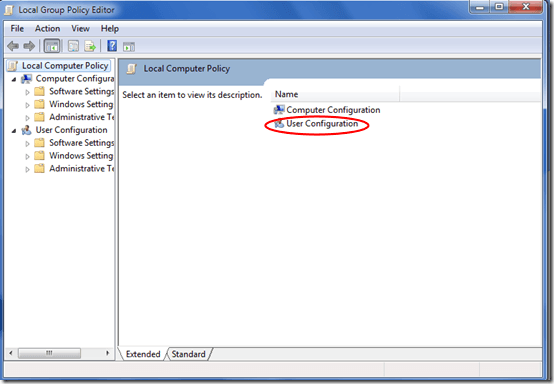
The Local Group Policy Editor should open. Click User Configuration.
image 4
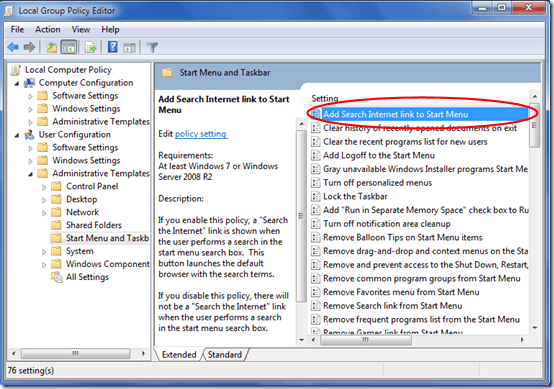
Click Administrative Templates, then click Start Menu and Taskbar. A new menu will open to the left. Double-Click Add Search Internet Link to Start Menu.
image3
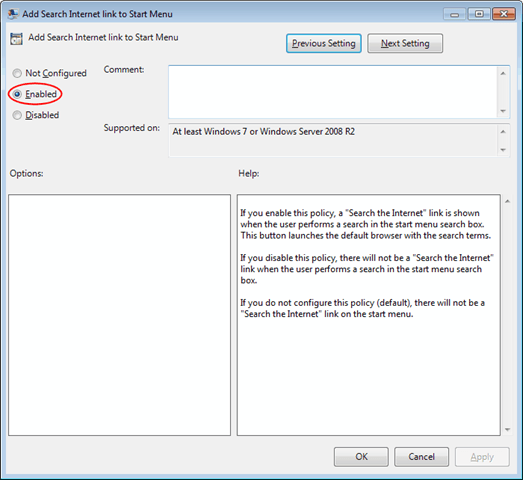
Select Enabled then click Ok.
image_1
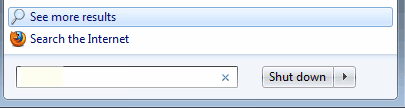
Now, when you search using the start menu’s search box, a link will appear tosearch the internet. Simply click and your search string opens in your default search provider in your default browser.
image_2
This trick only works with Professional and Ultimate versions of Windows 7—Home editions will not work.

Monetize your Website or Blog with BidVertiser

Sunday, December 19, 2010

So You Got a Laptop This Holiday Season: Now What?


Lucky You. Someone was generous enough to give you a shiny new laptop, maybe even that swanky HP Envy 14 we were raving about a few weeks ago. So now what?
We’re here to help you welcome that new machine into your home in grand style. So go ahead, here’s the top gear and software you’ll need to make that lappie feel right at home.

Ninite App Installer


laptop

There are loads of small apps you have to install when you get a new PC, including your favorite browser, chat software, and various utilities. With Ninite, you can install them all in one click and save yourself hours of tedium.
Go to the Ninite website, choose your favorites by clicking checkboxes, and then download your own customized installer that places all those software picks on your new machine.
What to choose from this cornucopia of freebies? Might we suggest DropboxDropbox, the easiest file synchronizer in the world? In addition to that, all the usual suspects are there, including Adobe Flash, Chrome,FirefoxSkype, Security Essentials and even iTunes. Out of 81 choices, there’s bound to be a few in there you’ll need. One click and you’re done.
By the way, Ninite’s install routine doesn’t surreptitiously add any of those pesky toolbars or any other junkware. Try it out — you’ll love it.

Belkin Easy Transfer Cable for Windows 7


HP Envy 14

Transfer all your precious pics, flicks, tunes and docs from your old computer to the new one with this $20 USB cable. This unusually high-priced length of wire also lets you transfer your applications from one PC to another (sorry, it’s not for Macs).
If you’re not a fan of fiddling with software peculiarities, you’ll be happy to learn that there’s no clunky driver installation required when you’re using the Belkin Easy Transfer Cable, according to Belkin. Aimed at novice users, the cable is ideal if you don’t have a fast network to transfer multiple gigabytes of data.

Call of Duty: Black Ops


HP Envy 14

If you followed our buying advice and picked up that sweet HP Envy 14 laptop, you’ve got enough horsepower to leap into the gaming maelstrom. Indeed, you’ve now got a 1GB Radeon HD 5650 video card inside with enough juice to run the hottest game on the planet, Call of Duty: Black Ops.
Go for it, soldier. Although that 14.5-inch screen is outstanding, cranking out sharp-looking video and wide viewing angles, do the game justice and get yourself an external monitor for a bigger view and extra immersion. Don’t go for resolution over 1920×1200, though — we tried running the Envy through a 2560×1600 display and it couldn’t handle that, instead stepping down to a lower rez.
Finally, the Envy rocks the Beats Audio, and the Call of Duty: Black Ops soundtrack will do it justice, with big-time Hollywood actors Ed Harris and Gary Oldman manning the big guns. Lock and load!

clicksor

Related Posts Plugin for WordPress, Blogger...

Share

Twitter Delicious Facebook Digg Stumbleupon Favorites More