I just got a message in Facebook from a friend whose Google Account was hijacked and the password was changed by the hacker. That person is now looking for some kind of a Google helpline to help him revive the account.
It can be a nightmare if someone else takes control of your Google Account because all your Google services like Gmail, Orkut, Google Calendar, Blogger, AdSense, Google Docs and even Google Checkout are tied to the same account.
Here are some options suggested by Google Support when your forget the Gmail password or if someone else takes ownership of your Google Account and changes the password:
1. Reset Your Google Account Password:
Type the email address associated with your Google Account or Gmail user name atgoogle.com/accounts/ForgotPasswd - you will receive an email at your secondary email address with a link to reset your Google Account Password.
This will not work if the other person has changed your secondary email address or if you no longer have access to that address.
2. For Google Accounts Associated with Gmail
If you have problems while logging into your Gmail account, you can consider contacting Google by filling this form. It however requires you to remember the exact date when you created that Gmail account.
3. For Hijacked Google Accounts Not Linked to Gmail
If your Google Account doesn't use a Gmail address, contact Google by filling this form. This approach may help bring back your Google Account if you religiously preserve all your old emails. You will be required to know the exact creation date of your Google Account plus a copy of that original "Google Email Verification" message.
It may be slightly tough to get your Google Account back but definitely not impossible if you have the relevant information in your secondary email mailbox.
Starting from nothing to having your very own personal website that is accessible to anyone on the web is a huge leap. We know some people like to take the process slowly, step-by-step before investing in real web hosting. So, we compiled a short simple list of the best free web hosting sites that you can join and get free web hosting completely free. Each with it’s own unique edge. Some free web hosts has cPanel already incorporated, some offer more disk space and bandwidth, some free web hosts are known to reliable, and some are great for it’s simplicity. For whatever reason you may like a certain web host listed below, is guaranteed to deliver.
Note that this list of the best free web hosting sites has NO FORCED ADS whatsoever and enables you to use your very own domains free of charge.
Blogger – Blogger enables anyone to easily create their very own unique personal blog completely free under the .blogspot sub-domain. If you have your very own personal domain name already, you can easily adjust it so it will reflect your new domain name instead of the .blogspot sub-domain. Knowing that Blogger is run by Google, you can forget about worrying about web space.
Webs – Webs offers anyone the ability to create their very own website within minutes! With the tools that comes equipped with registering with Webs.com, it makes it easy for anyone to personalize their own website.
Tumblr – Tumblr is just like Blogger except is simplicity at it’s max. If you are a person who plans on creating a blog, using Blogger or Tumblr can easily supplement the job. Tumblr also accepts custom domain names just like Blogger.
Weebly – An ad-free alternative to easily create your own website or blog within matter of seconds is with Weebly’s advance site building tools. Weebly’s advance site building features emphasizes on being beginner friendly. Which means, basically anyone can customize and add features to their Weebly page without any prior coding knowledge.
DotEasy – DotEasy’s simple free hosting plan enables new webmasters the ability to use up to 100MB of hosting storage and 1GB of data transfers (bandwidth). The plan also comes equipped with the ability to create 10 e-mail accounts and host 10 add-on domain names.
Mister – Mister free web hosting plan supplies new webmasters the capability of using up to 250MB of disk space and 5GB of bandwidth. No problems. No hassles. No loopholes.
000WebHost – 000WebHost has been the leading free web host for sometime now. With the surplus features that 000WebHost supplements web host users, you almost think it is a paid web hosting. 000WebHost offers 1.5GB of disk space and permits 100GB of bandwidth usage every month.
AwardSpace – AwardSpace free web hosting plan offers 200MB of disk space and 5GB of bandwidth. Also allows FTP access, domain hosting, and more.
FreeHostia – FreeHostia’s Chocolate free web hosting plan offers the best of the best. Offers 24/7 customer service, 250MB disk space, 6GB of monthly bandwidth, and comes equipped with 40 1-click install scripts completely free.
x10Hosting – 500MB of disk space, 10GB of monthly data transfers, cPanel feature, GD library installed already, FTP access, sub-domains, add-on domains, parked domains, and many features more.
Byethost – Byethost offers free tech support, MySQL databases & PHP support, FTP access, the ability to create your very own forum and much more. Enables 5.5GB of disk space and 200GB of monthly transfers.
0Fees – A professional free web host alternative that offers much more than free web hosting. 0Fee’s servers comes equipped with a cluster of powerful web servers that are all interconnected to act as one super computer. This advanced technology is unheard of especially in the market of free web hosting. 0Fees offers 300MB of disk space, 10GB of monthly transfers, comes with PHP with MySQL databases, and allows up to 5 sub-, add-on domains.
110MB – 110MB offers 110 disk space, up to 100GB monthly transfers, and offers 24/7 customer service. 110MB is a ad-free web host.
50Webs – 50Webs enables unlimited domains to be hosted on their servers. 60MB of disk space and free FTP access control. Comes equipped with an easy to use control panel with full 24/7 customer support.
HostHelpers – Disk space 1GB, 10GB of monthly bandwidth, and comes with the ability to do Cron jobs.
HelioHost – HelioHost free web hosting plans comes with 250MB of disk space and 2.5GB of monthly bandwidth. COmes with cPanel with FTP access.
HostCell – Free full featured cPanel hosting with PHP, Perl, ASP.net, Java, and more. Comes ad free with FTP access. 300MB of disk space and 5GB of bandwidth.
000Space – 000Space comes with a Vista build in control panel. Allows up to 50 mySQL databases, 50 domains, phpMyAdmin, and access to a FTP account. Comes with 5.5GB of disk space and 200GB of monthly transfers.
My3GB – 3GB of disk space, 30GB of bandwidth, 2 MySQL databases, and PHP scripting with no forced ads. Comes with FTP access as well.
JustFree – JustFree is a great free web hosting alternative that gives users a generous 80GB of disk space to store HTML, PHP, MySQL, graphics, and other web related items. You also get the full ability of uploading whatever script your heart desires. Comes with an abuse prevention system to detect abusers too. As long as you aren’t flagged for suspicious behavior, you may use up to 80GB of bandwidth in a single month.
Facebook has been supporting Twitter like @ tagging while writing new updates or wall posts. This helped users to mention their friend in their updates. However, annoyingly this feature was missing in their commenting system.
So if you wanted to reply to a specific person, you could not tag them. Instead, you would have to use @name to ensure that your comment was directed to the right person.
A little while earlier, I was trying to explain @ tagging to someone when I saw that the @ tagging actually works in comments too. This is definitely good news, because users will not be able to directly mention people in their comments.
Comment tagging works similarly to how the regular tagging works. You just have to type an @ followed by the person’s name or handle and a drop-down will be displayed to you. You can then choose which person or page you want to tag in the comment. When you have tagged someone in a comment they will receive a notification saying so.
Do you like the tagging feature in Facebook? Do you think that allowing people tagging in comments would behelpful? Do feel free to tell me about your thoughts.
starplus hindi channel online , starplus free streaming , watch starplus online for free ,starplus channels online , watch starplus tv channels online on the internet , starplus hindi songs online , hindi top ten movies , watch starplus movies online free , bollywood video , hindi new films .
Thousands of fonts are freely available throughout the Internet. Most of us have acquired font collections that number well into the hundreds. Yet, even with all of these fonts, finding the right one for our projects requires typing our text, then scrolling through and selecting font after font until we happen to hit the right one.
WordMark.it has a solution to this computer-age old problem.
To see a word or group of words in all of your available fonts, highlight wordmarkand type your own word or phrase.
Click the load fonts button. It will turn green as your mouse rolls over it.
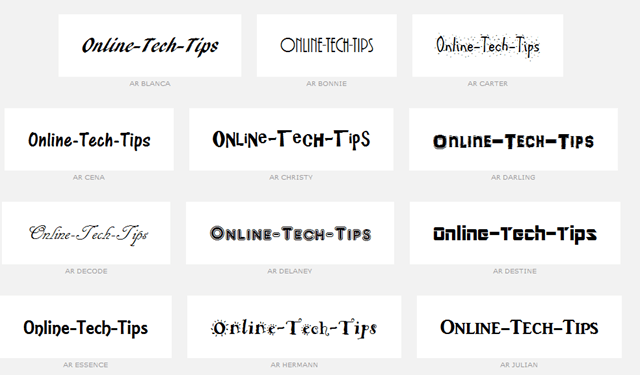
Within a few seconds, your chosen text is displayed in every one of the installedfonts on your computer. Scroll down to see all of your font options.
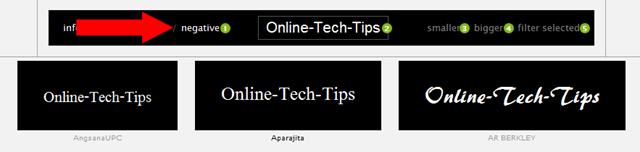
To see the text displayed as white on black background, click the negative link at the top of the screen.
Click the smaller or bigger links at the top of the screen to resize the text.
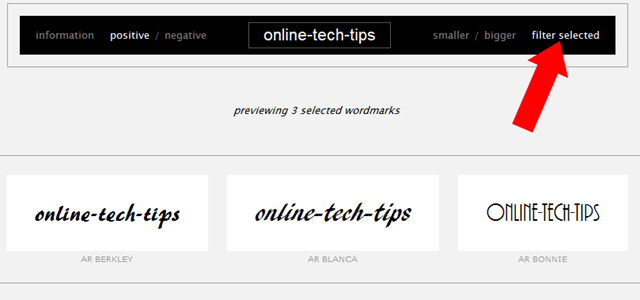
To compare font styles side-by-side, select a few font options from your list by clicking on them, then click filter selected at the top of the screen.
WordMark.it is a great way to find the perfect font style for a word or phrase. The site loads quickly, and the font styles are accurate depictions. We like being able to compare our favorites side-by-side for final decision making with the filter selectedtool. WordMark.it is definitely worth a bookmark for those times when finding the right font is imperative.
Windows Live Movie Maker is a fun application that is part of the Windows Live suite of applications that Microsoft has developed to give users the ability to jazz up videos to make them look more professional.
Unfortunately, there is still no way to create animation in Windows Live itself however. This doesn’t mean you’re dead in the water though, as there is a way to create animation by combining MS Paint with Movie Maker, and it all harkens back to the old days of cartoon animation.
To begin, load MS Paint and start start drawing something that you would like to animate. In this example, we will create the animated effect of a car moving across the screen from one side to the other.
We begin by drawing the car freehand using all default attributes.
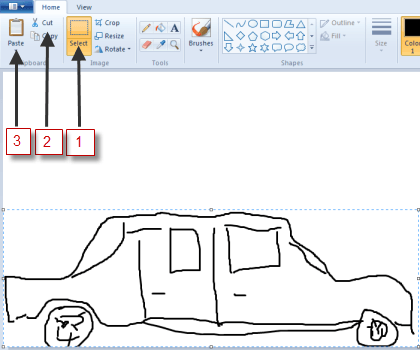
Next, use the Select tool to “capture” the car. Draw a rectangle around the car as close to the car as possible, and then let go; next click on the Cut command on the main menu.
As soon as you click on Cut, the car should disappear, then immediately click on thePasteicon. The picture you just cut out should now reappear, with the frame still around it, this means you can drag it to wherever you wish on the paint canvas. To create the illusion of movement, move the image (car) to one side of the screen to begin its journey across the screen, moving from left to right:
Click the File command icon, and then choose Save as. Choose any filename you like, but end it with the number 1. In this case, we’ll call it c1, for car 1.
Next, hit the Back icon to undo what you just did; the car should disappear again. Click on the Paste icon again, to paste it back in, then move it again, just as you did the first time, only this time, put it slightly ahead of where you did the first time.
Then, do the Save as thing again, only this time, name it with a 2, e.g. c2.
Repeat this whole process as many times as it takes to get the car moved all the way across the screen with each step along the way saved as a unique series of consecutive file names.
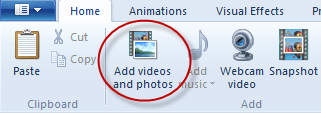
Then, close down Paint and fire up Windows Live Movie Maker; click on Add videos and photos:
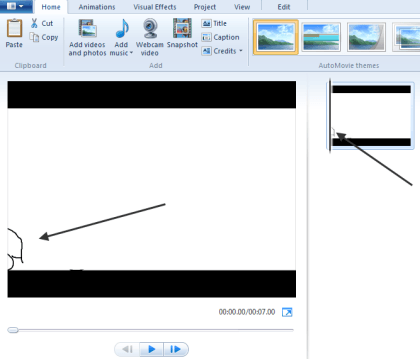
Use the file manager tool that is launched to maneuver to and locate the files you just created in Paint. Double-click on the first one, in this case, C1, to open it. It should look something like this:
It should show up in both the big main pane and in the little pane on the right, indicating that it will be the first image displayed in the “video.”
Open the rest of the images you created in Paint, one after another in sequence until all of the images have been loaded.
If you choose to play the movie as things are at this point, the time that each image is shown on the screen would be far too long, and thus it wouldn’t look animated. To fix that, we need to change the amount of time each image is displayed.
To do that, click on the the first image in the sequence, then while holding down the Shift key, move to the last one, then click on it as well. This should cause all of your images to be selected. It should look something like this:
Note: The bottom part of the image above was cut off for clarity.
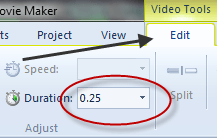
Next, click on the Edit tab from the main menu and type .25, as in ¼ of a second, in the duration box. You want the application to hold onto each picture just long enough for it to be displayed,which means the player will move through all of them quickly enough to simulate motion.
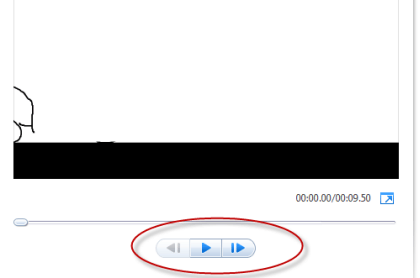
Finish by clicking the Play button under the main viewing screen:
You should see your images load sequentially, one after the other, quickly enough so that it appears as if your image is moving across on the screen. This is exactly how animation used to be done, except the images were drawn by hand, then flashed quickly in front of a camera which recorded the action as an animated movie.
This same technique can be used to simulate multiple characters moving around, or just their mouths moving to simulate them speaking. It can also be done by taking a series of photographs of an object that is moved slightly between each take.
The Snow Standalone Gadgets Pack is a collection of 15 shiny white desktop gadgets for Windows XP, Vista and 7. This new gadget pack is a modification of the previous gadget pack from the same designer. The Snow Standalone Gadgets Pack consist of the same gadgets as on the previous but has been redone entirely in white.
The gadget collection contains a wireless connection indicator, IP address, the current date and battery life, RSS feed reader, links to your libraries, weather, Sticky Notes and so on.
The Snow Standalone gadgets blends beautifully on Windows 7 and Vista, but they also integrate perfectly on your XP machine.
Iam a b.tech student doing it from SRM university. My branch is computer science and engineering. I love blogging and internet the other blog which I had started soon is and http://www.cricketscore.tk