adbrite

Star cricket live streaming

Watch live world cup matches live and exclusive here just click on the above banner.

Under this section all posts are related to hacking

You will find the posts related to hacking here the posts are nice and can be very useful to you.

The post under title Gadgets

Get to know about new and interesting gadgets.

This is default featured post under the category Computer

Computer related posts under this topic.

Showing posts with label WEBSITE'S INFO. Show all posts

Thursday, April 21, 2011

5 Free Solutions To Create A Question-Answer Website


Question & answer websites (like Stack Overflow) are great platforms for enabling communities to share knowledge and help each other.
Although they are kinda similar-in-function with the forum applications (check9 Widely-Used And Free Forum Softwares), the main focus is finding the (best) answers.
Here are 5 free and open source or hosted platforms to create your own question-answer website:

Question2Answer

Question Vote
Question2Answer is an application that is built with PHP-MySQL that has a points-based reputation system.
Users can comment into any questions and they can be tagged.
It can be totally styled with CSS and has an admin interface to manage the whole application.

QSQA

QSQA
QSQA enables anyone to instantly create a full-featured question-answer community where users can earn point/badges for their contribution.
It is written in Python and powered by the Django application framework.

Shapado

Shapado
This question-answer application is written in Ruby, MongoMapper and MongoDB.
It is multilingual and, optionally, users can create their own websites in a free hosted platform rather than installing it.

Qwench

Qwench
Qwench is a simple-yet-functional application.
It comes with a points/rewards system, an entry can be posted as a knowledge-base article (for corporate sites) and it can be customized via CSS.

Qhub

Qhub
Qhub is a free hosted platform for creating a q&a website where the look-feel can be customized and members can be managed easily.
You can optionally use a URL under Qhub or your own domain name.


Monetize your Website or Blog with BidVertiser

Tuesday, April 5, 2011

My New Tech Blog with .com domain


Hi friends this is to tell  you that I have purchased a domain and I have started a new blog called www.webretina.com.  At WebRetina we bring for you useful softwares, how to guide, web directory, our special section is Live TV and for entertainment part we have for you flash games and various other things.

Monetize your Website or Blog with BidVertiser

Tuesday, March 15, 2011

20 Best Free Web Hosting Sites With No Ads


Starting from nothing to having your very own personal website that is accessible to anyone on the web is a huge leap. We know some people like to take the process slowly, step-by-step before investing in real web hosting. So, we compiled a short simple list of the best free web hosting sites that you can join and get free web hosting completely free. Each with it’s own unique edge. Some free web hosts has cPanel already incorporated, some offer more disk space and bandwidth, some free web hosts are known to reliable, and some are great for it’s simplicity. For whatever reason you may like a certain web host listed below, is guaranteed to deliver.
Note that this list of the best free web hosting sites has NO FORCED ADS whatsoever and enables you to use your very own domains free of charge.
  1. Blogger – Blogger enables anyone to easily create their very own unique personal blog completely free under the .blogspot sub-domain. If you have your very own personal domain name already, you can easily adjust it so it will reflect your new domain name instead of the .blogspot sub-domain. Knowing that Blogger is run by Google, you can forget about worrying about web space.
  2. Webs – Webs offers anyone the ability to create their very own website within minutes!  With the tools that comes equipped with registering with Webs.com, it makes it easy for anyone to personalize their own website.
  3. Tumblr – Tumblr is just like Blogger except is simplicity at it’s max. If you are a person who plans on creating a blog, using Blogger or Tumblr can easily supplement the job. Tumblr also accepts custom domain names just like Blogger.
  4. Weebly – An ad-free alternative to easily create your own website or blog within matter of seconds is with Weebly’s advance site building tools. Weebly’s advance site building features emphasizes on being beginner friendly. Which means, basically anyone can customize and add features to their Weebly page without any prior coding knowledge.
  5. DotEasy – DotEasy’s simple free hosting plan enables new webmasters the ability to use up to 100MB of hosting storage and 1GB of data transfers (bandwidth). The plan also comes equipped with the ability to create 10 e-mail accounts and host 10 add-on domain names.
  6. Mister – Mister free web hosting plan supplies new webmasters the capability of using up to 250MB of disk space and 5GB of bandwidth. No problems. No hassles. No loopholes.
  7. 000WebHost – 000WebHost has been the leading free web host for sometime now. With the surplus features that 000WebHost supplements web host users, you almost think it is a paid web hosting. 000WebHost offers 1.5GB of disk space and permits 100GB of bandwidth usage every month.
  8. AwardSpace – AwardSpace free web hosting plan offers 200MB of disk space and 5GB of bandwidth. Also allows FTP access, domain hosting, and more.
  9. FreeHostia – FreeHostia’s Chocolate free web hosting plan offers the best of the best. Offers 24/7 customer service, 250MB disk space, 6GB of monthly bandwidth, and comes equipped with 40 1-click install scripts completely free.
  10. x10Hosting – 500MB of disk space, 10GB of monthly data transfers, cPanel feature, GD library installed already, FTP access, sub-domains, add-on domains, parked domains, and many features more.
  11. Byethost – Byethost offers free tech support, MySQL databases & PHP support, FTP access, the ability to create your very own forum and much more. Enables 5.5GB of disk space and 200GB of monthly transfers.
  12. 0Fees – A professional free web host alternative that offers much more than free web hosting. 0Fee’s servers comes equipped with a cluster of powerful web servers that are all interconnected to act as one super computer. This advanced technology is unheard of especially in the market of free web hosting. 0Fees offers 300MB of disk space, 10GB of monthly transfers, comes with PHP with MySQL databases, and allows up to 5 sub-, add-on domains.
  13. 110MB – 110MB offers 110 disk space, up to 100GB monthly transfers, and offers 24/7 customer service. 110MB is a ad-free web host.
  14. 50Webs – 50Webs enables unlimited domains to be hosted on their servers. 60MB of disk space and free FTP access control. Comes equipped with an easy to use control panel with full 24/7 customer support.
  15. HostHelpers – Disk space 1GB, 10GB of monthly bandwidth, and comes with the ability to do Cron jobs.
  16. HelioHost – HelioHost free web hosting plans comes with 250MB of disk space and 2.5GB of monthly bandwidth. COmes with cPanel with FTP access.
  17. HostCell – Free full featured cPanel hosting with PHP, Perl, ASP.net, Java, and more. Comes ad free with FTP access. 300MB of disk space and 5GB of bandwidth.
  18. 000Space – 000Space comes with a Vista build in control panel. Allows up to 50 mySQL databases, 50 domains, phpMyAdmin, and access to a FTP account. Comes with 5.5GB of disk space and 200GB of monthly transfers.
  19. My3GB – 3GB of disk space, 30GB of bandwidth, 2 MySQL databases, and PHP scripting with no forced ads. Comes with FTP access as well.
  20. JustFree – JustFree is a great free web hosting alternative that gives users a generous 80GB of disk space to store HTML, PHP, MySQL, graphics, and other web related items. You also get the full ability of uploading whatever script your heart desires. Comes with an abuse prevention system to detect abusers too. As long as you aren’t flagged for suspicious behavior, you may use up to 80GB of bandwidth in a single month.


Monetize your Website or Blog with BidVertiser

Tuesday, March 8, 2011

View Any Text in All of Your Available Fonts at the Same Time


Thousands of fonts are freely available throughout the Internet. Most of us have acquired font collections that number well into the hundreds. Yet, even with all of these fonts, finding the right one for our projects requires typing our text, then scrolling through and selecting font after font until we happen to hit the right one.
WordMark.it has a solution to this computer-age old problem.
logo
To see a word or group of words in all of your available fonts, highlight wordmarkand type your own word or phrase.
word
Click the load fonts button. It will turn green as your mouse rolls over it.
load fonts
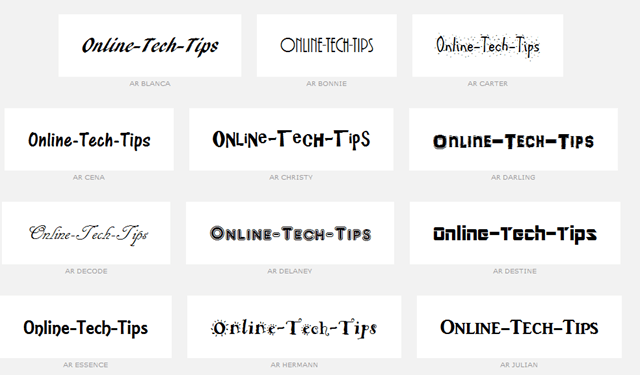
Within a few seconds, your chosen text is displayed in every one of the installedfonts on your computer. Scroll down to see all of your font options.
font options
To see the text displayed as white on black background, click the negative link at the top of the screen.
negative
Click the smaller or bigger links at the top of the screen to resize the text.
smaller bigger
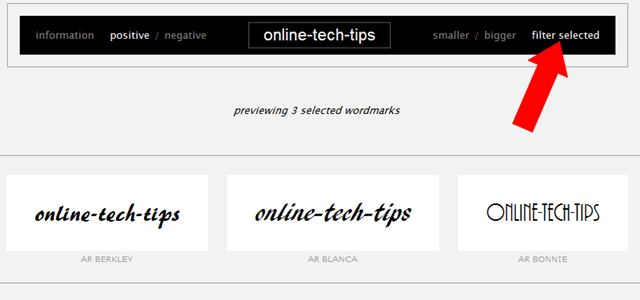
To compare font styles side-by-side, select a few font options from your list by clicking on them, then click filter selected at the top of the screen.
filter
WordMark.it is a great way to find the perfect font style for a word or phrase. The site loads quickly, and the font styles are accurate depictions. We like being able to compare our favorites side-by-side for final decision making with the filter selectedtool. WordMark.it is definitely worth a bookmark for those times when finding the right font is imperative.


Try the website right here : 


Monetize your Website or Blog with BidVertiser

Friday, February 4, 2011

The World’s Most Blocked Websites

This summary is not available. Please click here to view the post.

Saturday, January 29, 2011

All the Tools You Need for Setting Up a Virtual Office for your business


virtual office employeeVirtual offices, where employees and co-workers can be located in any corner of the world, have become a reality. More and more businesses are keen on exploring the concept of "virtual office" because they save on office rentals, employee commuting costs and host of other "unnecessary" expenses.
While members of a virtual team do not meet face to face very often, they do frequently interact online for discussions, brain-storming and training sessions to ensure that everyone is on the same page.Here we look at some extremely useful online tools and web services to help your virtual teams connect and collaborate with each other and with clients.
google-apps-officeEmail and Calendar: If you are running a virtual office, you need Google Apps. Period. This powerful suite offers email (Gmail), calendar (Google Calendar) and web-based Office suite (Google Docs) for each of your employees with plenty of storage space.
Instant Messaging: While Google Apps also provides a lightweight IM client called Google Talk, Skype is recommended because it also supports group chats and video conferencing in addition to text and audio chats.Another useful feature of Skype is SkypeCasts where you can host voice conference calls with dozens of participants. The host can easily moderate discussions in Skypecasts. Cost: $0.box.net-screenshot
Online File Storage: When you have a virtual team, it is important to maintain a repository of documents (and other files) at some central location that can be accessed by other members 24x7. This could include client proposal templates, PDFs, software installers, photographs, video clips and more.
Box.net provides a very simple explorer like interface for storing your files on the internet categorized using tags and folders. The free version of Box.net offers 1 GB of storage space. Other popular player in the online storage space businesses are XDrive (AOL), Adobe Share, Office Live Workspace (Microsoft) and the upcoming Google Drive.
Telephone Calls: Though it is possible to make PC-to-PC phone calls using Skype or Yahoo! Messenger for free, JAJAH is a more appropriate and cost-feasible solution if you want make long-distance or international phone calls.JAJAH uses VoIP to connect traditional phones (landline or mobile) and hence the calls are relatively cheaper than what telecom companies would charge for the same call.crossloop
Technical Support: While big companies have proper IT staff to fix technical issues, virtual offices can consider using CrossLoop, a remote desktop sharing solution. When you face a problem with your computer, any expert in the team can take control of your machine using CrossLoop and fix the issue for you. Price: $0.
Screen Sharing: Microsoft SharedView is a free screen sharing application that allows upto 15 virtual team members to connect and collaborate. They can share their desktop screens, work together on the same document (and track changes) and transfer files.
SharedView is a good choice if you have to deliver a lecture or training session online to a large group of participants.
microsoft screen sharing
The other option for web meeting is Adobe Brio that also offers a whiteboard, some annotation tools, voice and video chat but Brio (the free version) only supports a maximum of three participants per session.
Setup Network Folders: Leaf Networks provide a simple solution for you to share files and folders on your computer with other team members. It’s like a virtual LAN - you designate the files / folders that are to be shared and then invite others to connect to your computer. And not just files, Leaf can also be used for sharing network drives and printers - that means you can send print jobs even remotely.
conceptshareDiscuss Real Designs: If your work involves discussing designs, layout and prototypes with teammates and remote clients for approvals,ConceptShare is all that you need.
It’s like the designers and clients sitting on a virtual table with the project designs rolled out before them – they can mark things that need to improved, add comments and more. The basic version of ConceptShare is free.
Other than these “work related” tools, you can also consider using Wikis (Wetpaint or the upcoming Jotspot) for teammates to connect with each other for fun and non-work related activities.Start Pages (like Netvibes or PageFlakes) can be used as virtual notice boards where one can read all the important announcements, upcoming events, TO DO lists, news, blog buzz and more.
And most of these tools can be accessed from the web browser or even your mobile phone

Monetize your Website or Blog with BidVertiser

Wednesday, January 26, 2011

The 101 Most Useful Websites


Useful Websites Worth a Bookmark!
The sites mentioned below, well most of them, solve at least one problem really well and they all have simple web addresses (URLs) that you can easily learn by heart thus saving you a trip to Google.
In a hurry? Download this list as a PDF eBook and read it anywhere.
01. screenr.com – record movies of your desktop and send them straight to YouTube.
02. bounceapp.com – for capturing full length screenshots of web pages.
03. goo.gl – shorten long URLs and convert URLs into QR codes.
04. untiny.me – find the original URLs that's hiding behind a short URLs.
05. localti.me – know more than just the local time of a city
06. copypastecharacter.com – copy special characters that aren't on your keyboard.
07. topsy.com – a better search engine for twitter.
08. fb.me/AppStore – search iOS app without launching iTunes.
09. iconfinder.com – the best place to find icons of all sizes.
10. office.com – download templates, clipart and images for your Office documents.
11. woorank.com – everything you wanted to know about a website.
12. virustotal.com – scan any suspicious file or email attachment for viruses.
13. wolframalpha.com – gets answers directly without searching  - see more wolfram tips.
14. printwhatyoulike.com – print web pages without the clutter.
15. joliprint.com – reformats news articles and blog content as a newspaper.
16. isnsfw.com – when you wish to share a NSFW page but with a warning.
17. e.ggtimer.com – a simple online timer for your daily needs.
18. coralcdn.org – if a site is down due to heavy traffic, try accessing it through coral CDN.
19. random.org – pick random numbers, flip coins, and more.
20. mywot.com – check the trust level of any website - example.
21. viewer.zoho.com – Preview PDFs and Presentations directly in the browser.
22. tubemogul.com – simultaneously upload videos to YouTube and other video sites.
23. truveo.com – the best place for searching web videos.
24. scr.im – share you email address online without worrying about spam.
25. spypig.com – now get read receipts for your email.
26. sizeasy.com – visualize and compare the size of any product.
27. whatfontis.com – quickly determine the font name from an image.
28. fontsquirrel.com – a good collection of fonts – free for personal and commercial use.
29. regex.info – find data hidden in your photographs – see more EXIF tools.
30. tineye.com – this is like an online version of Google Googles.
31. iwantmyname.com – helps you search domains across all TLDs.
32. tabbloid.com – your favorite blogs delivered as PDFs.
33. join.me – share you screen with anyone over the web.
34. onlineocr.net – recognize text from scanned PDFs and images – see other OCR tools.
35. flightstats.com - Track flight status at airports worldwide.
36. wetransfer.com – for sharing really big files online.
37. pastebin.com – a temporary online clipboard for your text and code snippets.
38. polishmywriting.com – check your writing for spelling or grammatical errors.
39. awesomehighlighter.com – easily highlight the important parts of a web page.
40. typewith.me – work on the same document with multiple people.
41. whichdateworks.com – planning an event? find a date that works for all.
42. everytimezone.com – a less confusing view of the world time zones.
43. warrick.cs.odu.edu – you'll need this when your bookmarked web pages are deleted.
44. gtmetrix.com – the perfect tool for measuring your site performance online.
45. imo.im - chat with your buddies on Skype, Facebook, Google Talk, etc. from one place.
46. translate.google.com – translate web pages, PDFs and Office documents.
47. youtube.com/leanback – enjoy a never ending stream of YouTube videos in full-screen.
48. similarsites.com – discover new sites that are similar to what you like already.
49. wordle.net – quick summarize long pieces of text with tag clouds.
50. bubbl.us – create mind-maps, brainstorm ideas in the browser.
51. kuler.adobe.com – get color ideas, also extract colors from photographs.
52. followupthen.com – setup quick reminders via email itself.
53. lmgtfy.com – when your friends are too lazy to use Google on their own.
54. tempalias.com – generate temporary email aliases, better than disposable email.
55. pdfescape.com – lets you can quickly edit PDFs in the browser itself.
56. faxzero.com – send an online fax for free – see more fax services.
57. feedmyinbox.com – get RSS feeds as an email newsletter.
58. isendr.com – transfer files without uploading to a server.
59. tinychat.com – setup a private chat room in micro-seconds.
60. privnote.com – create text notes that will self-destruct after being read.
61. flightaware.com – live flight tracking service for airports worldwide.
62. boxoh.com – track the status of any shipment on Google Maps – alternative.
63. chipin.com – when you need to raise funds online for an event or a cause.
64. downforeveryoneorjustme.com – find if your favorite website is offline or not?
65. example.com – this website can be used as an example in documentation.
66. whoishostingthis.com – find the web host of any website.
67. google.com/history – found something on Google but can't remember it now?
68. errorlevelanalysis.com – find whether a photo is real or a photoshopped one.
69. google.com/dictionary – get word meanings, pronunciations and usage examples.
70. urbandictionary.com – find definitions of slangs and informal words.
71. seatguru.com – consult this site before choosing a seat for your next flight.
72. sxc.hu – download stock images absolutely free.
73. zoom.it – view very high-resolution images in your browser without scrolling.
74. wobzip.org – unzip your compressed files online.
75. vocaroo.com – record your voice with a click.
76. scribblemaps.com – create custom Google Maps easily.
77. buzzfeed.com – never miss another Internet meme or viral video.
78. alertful.com – quickly setup email reminders for important events.
79. encrypted.google.com – prevent your ISP and boss from reading your search queries.
80. formspring.me – you can ask or answer personal questions here.
81. snopes.com – find if that email offer you received is real or just another scam.
82. typingweb.com – master touch-typing with these practice sessions.
83. mailvu.com – send video emails to anyone using your web cam.
84. ge.tt – quickly send a file to someone, they can even preview it before downloading.
85. timerime.com – create timelines with audio, video and images.
86. stupeflix.com – make a movie out of your images, audio and video clips.
87. aviary.com/myna – an online audio editor that lets record, and remix audio clips online.
88. noteflight.com – print music sheets, write your own music online (review).
89. disposablewebpage.com – create a temporary web page that self-destruct.
90. namemytune.com – when you need to find the name of a song.
91. homestyler.com – design from scratch or re-model your home in 3d.
92. snapask.com – use email on your phone to find sports scores, read Wikipedia, etc.
93. teuxdeux.com – a beautiful to-do app that looks like your paper dairy.
94. livestream.com – broadcast events live over the web, including your desktop screen.
95. bing.com/images – automatically find perfectly-sized wallpapers for mobiles.
96. historio.us – preserve complete web pages with all the formatting.
97. dabbleboard.com – your virtual whiteboard.
98. whisperbot.com – send an email without using your own account.
99. sumopaint.com – an excellent layer-based online image editor.
100. lovelycharts.com – create flowcharts, network diagrams, sitemaps, etc.
101. nutshellmail.com – Get your Facebook and Twitter streams in your inbox.

Monetize your Website or Blog with BidVertiser

clicksor

Related Posts Plugin for WordPress, Blogger...

Share

Twitter Delicious Facebook Digg Stumbleupon Favorites More